



























- June 29, 2026
- Uncategorized
In project management especially in large-scale projects as construction, planning and scheduling are the key for successful project execution, one of the most popular and important techniques used in project scheduling is the critical path method (CPM).
Primavera P6 is one of the main software tools used in project management, helping the project team visualize and analyze the critical path to ensure the project stays on track.
This article will not only provide an in-depth understanding of the concept of critical path method, its importance in construction project management, and how to analyze the “critical path” using Primavera P6, but also will explore the number of critical paths a project can have.
What is the Critical Path?
The Critical Path Method (CPM) is a project management technique used to determine the sequence of activities that define the minimum time required to complete a project.
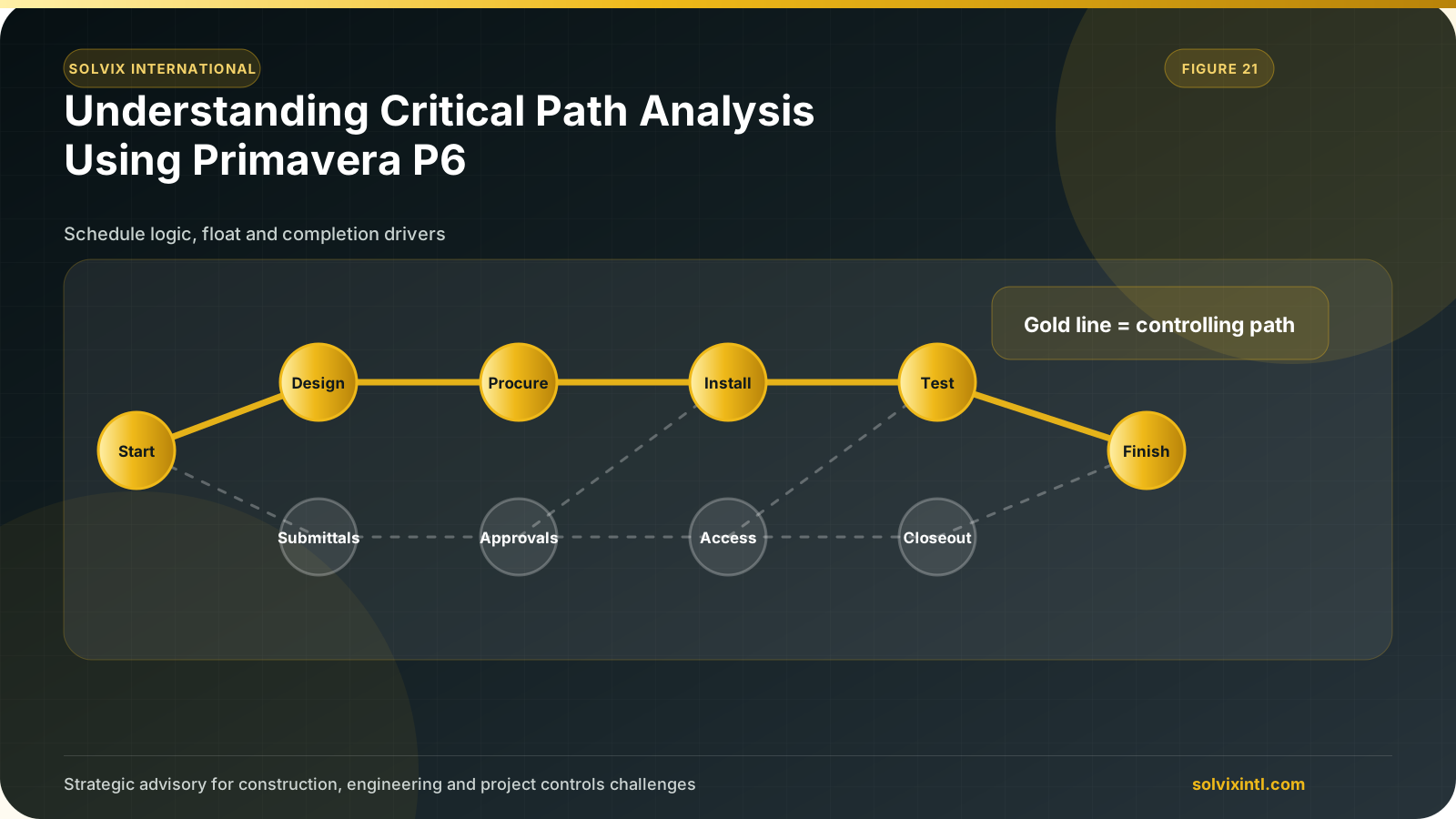
The Critical Path represents the longest chain of activities that dictates tasks that must be completed for the project to finish on time, these tasks have no ‘float” or “slack’’ time which means there’s no room for delay in these tasks without affecting overall project duration.
To understand this better, let’s say we’re constructing a building. We’ve a number of activities such as laying the foundation, framing, roofing and MEP works, some of these activities depend on the completion of others while other activities can be done side by side for example you can’t start framing unless foundation is finished, on the other side plumbing and electrical works might work in the same time.
If we chart out all the dependencies and timelines, we’ll get the critical path as the sequence of activities that takes the longest to complete. Any delay in these tasks will push the entire project beyond its deadline which makes it ‘critical’’ to the overall project schedule.
So, exploring critical paths in a project and managing it is important for effectively dealing with time and resources, especially when delays can lead to contractual penalties.
Why is Critical Path Important?
Time -particularly in construction projects- is as valuable as money. As time in these projects means increased costs that can lead to cost overruns, so managing the critical path is important for many reasons such as:
Timely Project Completion: Minimum project duration required to execute a project can be determined by critical path. Focusing on critical activities helps avoiding delays and ensures timely completion.
Resource Allocation: All construction projects involve using multiple resources such as labor, materials and equipment. Identifying critical activities helps optimize the use of these resources.
Risk Management: Critical path activities are more susceptible to delays, knowing critical activities and near-critical ones allows the project team to be proactive and manage risks effectively which reduces the chances of project delays.
Cost Management: Delays in construction projects can significantly increase costs due to extended use of resources and contractual penalties, keeping the critical path under control reduces these potential cost overruns.
Critical Path Analysis
Critical Path Analysis (CPA) in Primavera P6 starts with creating a project schedule with all relationships between tasks and calculating the project timeline. Now Primavera P6 automatically identifies the critical path enabling the project team to recognize activities that have a greater effect on project completion date.
Now, let’s know step by step how to analyze the critical path using Primavera P6.
Step 1: Define Project Activities & Establish Dependencies Between Them
First add all project activities in Primavera P6, to add new activity
From the Edit Toolbar click on (+) icon, you’ll see a new activity added.
Enter activity ID, name and duration.
Next, create dependencies between activities
Select the activity for which you want to define a relationship.
Go to the “Relationship” tab.
You’ll have two windows “Predecessor” and “Successor”. Click “Assign” to specify a predecessor or successor.
Select the relationship (SS-FS-FF-SF).
Step 2: Run the Schedule & Identify Critical Path
After defining activities and establishing their dependencies, run the project schedule. Primavera will automatically calculate start and finish dates for each activity.
Click on “Schedule” from the Layout Toolbar.
Select “Schedule” on the new window that appears.
Primavera P6 will identify critical path. To filter and view critical activities only:
Select the “Filter by” icon from the Layout Toolbar.
Check the box in front of Critical and then click “OK”.
Exploring Critical Paths in Project Schedules & Can There Be More Than One?
In many projects, it’s most likely to have one critical path. But in more complex projects critical paths can become more complicated due to the size, scope, and number of interrelated activities. That’s why it’s important to explore the several aspects of critical paths, including the number of critical paths one project can have, critical branches, and near-critical activities.
Number of Critical Activities
In many complex projects, there may be more than one critical path. This occurs when several sequences of activities have the same duration and are similarly critical to completion of a project.
Having multiple critical paths can be due many factors, here are some of them:
Complexity of Project.
Duration of Activities.
Resource Constraints.
Slack Time.
To identify multiple critical paths in Primavera P6:
Click on “Schedule” from the Layout Toolbar.
Select “Options” from the new window that appears.
Select Advanced and check the box “Calculate multiple float paths”.
Same Critical Path with Different Critical Branches
Critical branches are activities that run at the same time and can affect the entire project completion date. The critical path can have multiple critical branches. For example, in a construction project, plumbing and electrical can work in parallel but they need to be finished before wall painting, any delay in any branch can delay project completion.
Near-Critical Activities
Activities that have a few days as total float are called near critical activities, which means they’re almost critical. If these activities happen to be delayed, they could be critical and impact project completion date. Project team needs to monitor these activities closely to make sure they don’t turn into critical activities unexpectedly.
To identify near-critical activities in Primavera P6:
Select “Filter by” from Layout Toolbar.
Add a new filter.
Set the new filter to show activities with a total float time less than or equal a certain threshold.
Multiple Critical Paths Imposes Additional Challenges
Having more than one critical path in a construction project makes it harder on the project team to manage the project as it requires significant attention, follow up and tracking because any delay in any of these paths will cause the whole project to be delayed.
Thus, you should not have multiple critical paths, that’s why project teams typically try to avoid them as your projects get riskier (i.e. more delays could become serious issues in other areas).
Some of the challenges of having more than one critical path is:
High Risk of Delay.
Increasing Complexity of Resource Management.
Higher Degree of Monitoring and Controlling.
To avoid these challenges, there are some risk management strategies such as:
Buffering key task.
Periodic status update meetings.
Preparing contingency plans for resource allocation.
Need support with this topic?
Solvix provides critical path analysis using Primavera P6 services
Solvix International provides critical path analysis using Primavera P6 services as part of its project controls and scheduling support. Our team can review, build, correct, and maintain Primavera P6 schedules so project teams have reliable programme information and defensible records.

ramez.megahed.sci@gmail.com
Head of Architecture & DesignHead of Architecture & Design with over a decade of experience leading large-scale real estate and construction projects. Known for his strategic mindset and leadership excellence, he has successfully driven high-value developments from concept to completion while ensuring operational efficiency and long-term growth.